
TechWeb 2
Wireless Live Access To Alarm SQL For Field Technicians with iPad /
Android / Kindle Fire / Windows 7 / Touchscreen Devices
Mobile Field Service System Powerful field service software
accesses vital Alarm SQL customer data wirelessly.
Now with Signature Capture and GPS Logging.

TechWeb is an essential tool for any business involved with field service. Designed for field technicians or anyone requiring live access to customer data wirelessly, TechWeb provides the freedom of mobile access to your Alarm SQL data via any touchscreen tablet device with a web browser.
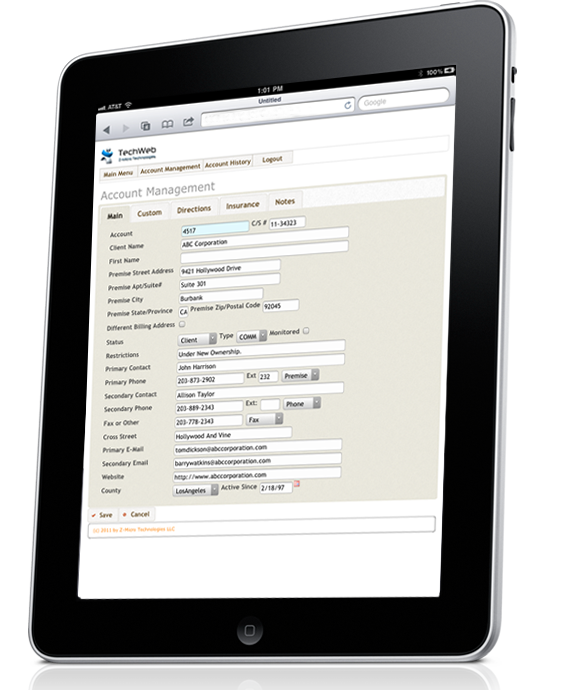
Whether used on the impressive iPad or other touchscreen tablets, TechWeb is designed for fast access to customer history, installed equipment, zone list, emergency contact lists, alarm signal history, service history, inventory, rolodex, support records, and more. Even laptop/netbooks, PC and Mac computers can be used if they have internet connection - perfect for the home office or work-at-home staff members. With built-in security levels to control access by each user, TechWeb is a vital resource for anyone in your business that needs wireless access to customer data anytime, anywhere.
TechWeb was designed from the ground up to be compatible with a wide variety of mobile devices rather than be restricted to use on just one type of device. With 'style sheets' included for the most popular screen formats (additional screen format style sheets provided if needed at no additional charge), TechWeb is extremely flexible to meet the specific needs of your mobile workforce.
The Wealth Of Alarm SQL Data In Your Hand
TechWeb places the vast majority of your customer data into the palm of your hand - anywhere. Live wireless access to view or add/modify (based upon user security levels) many of Alarm SQL's areas including:
Customer Section
- Customer List
(sort/search by Name, Account Number, Phone Number,
Contact Name)
- Main Customer Data (Name, address, phones,
contacts, email, restrictions, etc.)
- Customer User-Definable Fields
- Recurring Charges
- Customer Documents
- Contract Types
- Googlemaps Link
- Insurance Certificate/Sensors Information
- Service History
- Support List
- Invoice History (view only) including Invoice Details and
Payments. Email invoice capable.
- Installed Equipment List
- Emergency Contact and User Access List
- Installed Zones List
- Alarm Signal Event History
- Site Directions and Special Service Instructions
- Central Stations List
Service Ticket Section
- Service Ticket
List (sort/search by appointment date, tech,
category, ticket number)
- Service Ticket Data (dates, times, service
requested, service performed, notes, etc.)
- Googlemaps Integration
- Allow Tech Access To Only Their Scheduled Service Tickets
- Timecards Section (Tech, Start Time, End Time, Labor
Category, Overtime, Travel, Rate Codes)
- GPS Logging Of Technician Location When Timecards Filled Out
- Installed/Serviced Items Section
- Inventory Stock Adjustments By Location (if enabled)
- Automatic Materials and Labor Calculations (if enabled)
- Billable charge area
- Payment Accepted Indicators For Cash/Check/Credit Card
- Client Signature Capture and GPS Logging of Location Where Client Signed
- Email client copy of ticket
Appointment Calendar Section
- Daily Appointment List and Appointment Details
Support Section
- Support List
(sort/search by date, customer name, tech)
- Support Data (date, time, length of call,
priority, disposition, tech, notes)
- Schedule Follow-Up Appointments
Rolodex Section
- Rolodex List
(sort/search by company, contact, phone)
- Rolodex Data (name, company, address, phones,
email, comments)
Inventory Section
- Inventory List
(sort/search by Part Id, description, Manufacturer
Code, Category)
- Inventory Data (part id, description, category,
sub category, warranty, price levels, vendor, stock
status, kits,)
- Inventory By Location
- Perform Physical Inventory By Location
- Inventory Documents (user manuals, data sheets,
installation manuals, etc.)
- Purchase Orders with email capabilities
- Vendor List
KnowledgeBase Section
- KnowledgeBase
List (sort/search by Description ID)
- Detailed KnowledgeBase Notes
Mapping
- Mapping (authorized management only) shows locations of techs by timecard completion as well as client signature capture
Above sections have access rights based upon security level per user. Each section may be granted/denied access.
Pricing
TechWeb is available with flexible
pricing plans to fit the budget of every security
dealer. License includes usage for an unlimited number
of users in your company. Requires Alarm SQL and
sufficient SQL seat availability (typically 1 SQL seat
is enough for most environments but may require
additional seats during high usage times with many
multiple technicians).
| Software | Description | Price |
| TechWeb |
One-Time Full License Purchase (Rrequires maintaining an Annual Z-Micro Technologies Support Contract). Price based upon current Alarm license level |
$699 - $3999 |
We accept VISA, MASTER CARD,
AMERICAN EXPRESS and DISCOVER credit and debit cards.
Call Us Today! 1-877-864-5010.
Screens and features subject to change prior to release.
TechWeb Download Center
Resources to assist with your evaluation

TechWeb Live Online Demo
Video 1 - Introduction and Customer Profiles
Video 2 - Customer Emergency Contacts, Zones, etc.
Video 3 - Customer Account History
Video 4 - Inventory
Video 5 - Rolodex/Vendors/Centrals/Knowledgebase
Video 6 - Appointment Calendar
Video 7 - Service Management Segment 1
Video 8 - Service Management Segment 2
Video 9 - Security Settings
(For best viewing of videos, select 720p/full screen in Youtube)
TechWeb HighlightsTop Things To Know About TechWeb